Back from vacation and some days after the new year started our build pipeline for the iOS app in Xcode Cloud fails. The xcodebuild command still succedded but the signing of the app for ad-hoc and app-store distribution failed with Command exited with non-zero exit-code: 70
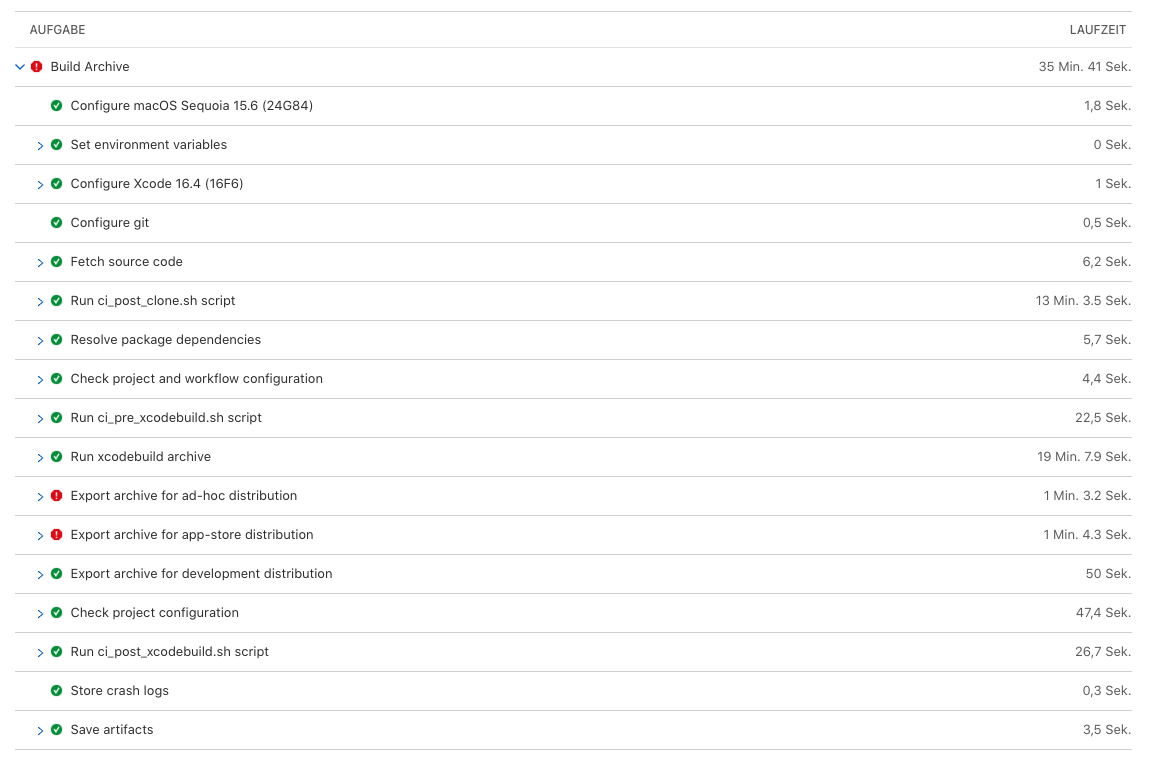
That's a snippet from the log.
Run command: 'xcodebuild -exportArchive -archivePath /Volumes/workspace/tmp/3dbe9cdf-8b26-4d08-98fc-ec820978e845.xcarchive -exportPath /Volumes/workspace/adhocexport -exportOptionsPlist /Volumes/workspace/ci/ad-hoc-exportoptions.plist '-DVTPortalRequest.Endpoint=http://172.16.47.196:8089' -DVTProvisioningIsManaged=YES -IDEDistributionLogDirectory=/Volumes/workspace/tmp/ad-hoc-export-archive-logs -DVTSkipCertificateValidityCheck=YES -DVTServicesLogLevel=3'

Error
Command exited with non-zero exit-code: 70
Some background why we use Xcode cloud.
At the beginning of last year, we've migrated from Azure Devops to Xcode Cloud because the build of the iOS version of our React Native app took about one hour. For internal testing we push the distribute the app by Firebase App Distribution. The migration was pretty easy using some additional steps in the iOS build process with the custom build scripts. With using XCode cloud the build time decreased by more than 50%.
Investigating it further
During the vacation days nothing has changed. Our workflow was still the same and there weren't any code changes which could lead to the problem.
Therefore the only reason could be expired certificates or provisioning profiles. Unfortunately, there were no certificates expired or revoked.
One important artifact of every build in XCode cloud is the Log file which contains the logs of the xcodebuild and signing steps. After comparing the logs for signing from the failed with the last successful one something weird was visible. The request for requesting the DVTServices: Response payload didn't contain any certificates.
2026-01-12T12:23:16.992744779Z	2025-12-23 06:56:24.555 xcodebuild[26013:105669]  DVTServices: Response payload: {
2026-01-12T12:23:16.992747015Z	  "data" : []
2026-01-12T12:23:16.992808870Z	  "links" : {
2026-01-12T12:23:16.992811619Z	    "self" : "https://developer-ci.corp.apple.com:443/services/v1/certificates?filter%5BcertificateType%5D=DISTRIBUTION_MANAGED&limit=200"
2026-01-12T12:23:16.992814240Z	  },
2026-01-12T12:23:16.992816002Z	  "meta" : {
2026-01-12T12:23:16.992817707Z	    "paging" : {
2026-01-12T12:23:16.992819465Z	      "total" : 1,
2026-01-12T12:23:16.992821323Z	      "limit" : 200
2026-01-12T12:23:16.992823022Z	    }
2026-01-12T12:23:16.992824692Z	  }
2026-01-12T12:23:16.992826793Z	}
In the last successful run, there was one included.
2025-12-23T14:56:24.992744779Z	2025-12-23 06:56:24.555 xcodebuild[26013:105669]  DVTServices: Response payload: {
2025-12-23T14:56:24.992747015Z	  "data" : [ {
2025-12-23T14:56:24.992749303Z	    "type" : "certificates",
2025-12-23T14:56:24.992751380Z	    "id" : "id",
2025-12-23T14:56:24.992753249Z	    "attributes" : {
2025-12-23T14:56:24.992755418Z	      "serialNumber" : "abc",
2025-12-23T14:56:24.992773108Z	      "certificateContent" : "",
2025-12-23T14:56:24.992784914Z	      "displayName" : "Company Name",
2025-12-23T14:56:24.992787108Z	      "name" : "Apple Distribution: Company Name",
2025-12-23T14:56:24.992789263Z	      "platform" : null,
2025-12-23T14:56:24.992791524Z	      "responseId" : "136ed97e-949c-428b-b0a3-c5513e2cfacc",
2025-12-23T14:56:24.992793996Z	      "expirationDate" : "2026-04-07T08:06:15.000+00:00",
2025-12-23T14:56:24.992796344Z	      "certificateType" : "DISTRIBUTION_MANAGED"
2025-12-23T14:56:24.992798263Z	    },
2025-12-23T14:56:24.992800337Z	    "links" : {
2025-12-23T14:56:24.992802983Z	      "self" : "https://developer-ci.corp.apple.com:443/services/v1/certificates/abc"
2025-12-23T14:56:24.992805363Z	    }
2025-12-23T14:56:24.992807115Z	  } ],
2025-12-23T14:56:24.992808870Z	  "links" : {
2025-12-23T14:56:24.992811619Z	    "self" : "https://developer-ci.corp.apple.com:443/services/v1/certificates?filter%5BcertificateType%5D=DISTRIBUTION_MANAGED&limit=200"
2025-12-23T14:56:24.992814240Z	  },
2025-12-23T14:56:24.992816002Z	  "meta" : {
2025-12-23T14:56:24.992817707Z	    "paging" : {
2025-12-23T14:56:24.992819465Z	      "total" : 1,
2025-12-23T14:56:24.992821323Z	      "limit" : 200
2025-12-23T14:56:24.992823022Z	    }
2025-12-23T14:56:24.992824692Z	  }
2025-12-23T14:56:24.992826793Z	}
Solving the signing issue
Solving this issue is much simpler than expected. In the Apple Developer Portal you need to open the Certificates, Identifiers & Profiles section. There some certificates created by Xcode Cloud will appear. These certificates are created automatically by Xcode Cloud when starting a workflow.
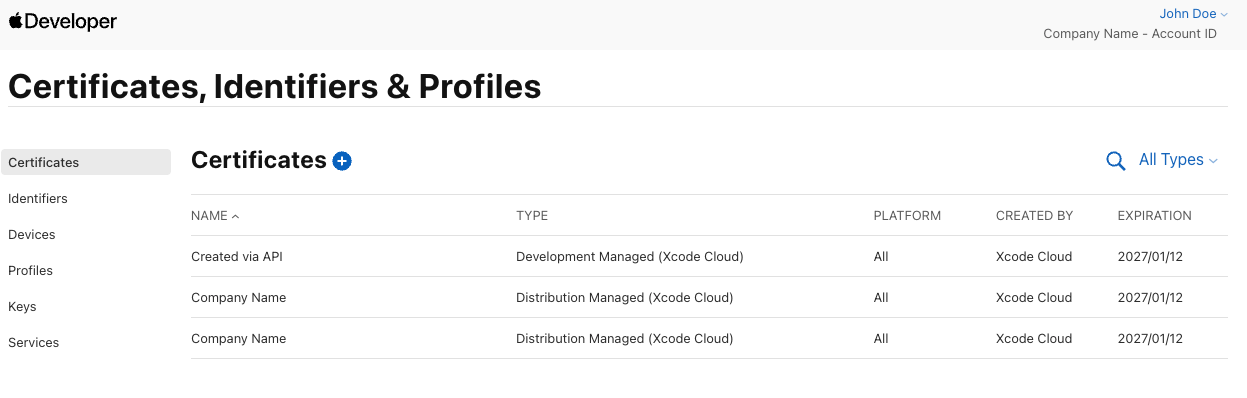
You just need to revoke those certificates by clicking on revoke in the detail view of the certificate.
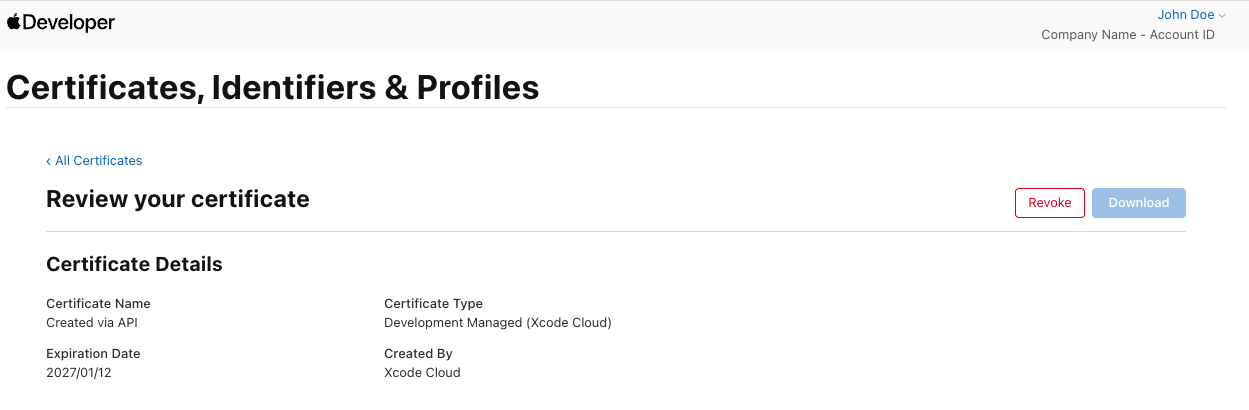
After the deletion of these certificates, you can trigger your workflows again. The signing for ad-hoc and app-store distribution should work and new certificates should be generated.
The reason for this issue might be that Apple internally generates some private keys which will expire or will be deleted due to the end of the year.